  1. Blog
  2. Article

Canonical
3 August 2017

Upgrading your Ubuntu-on-Windows install to the app version


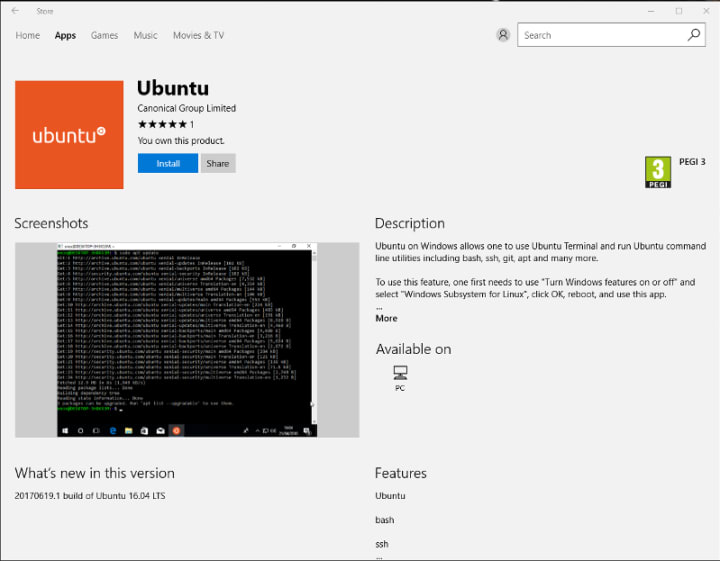
Our team and Microsoft recently released Ubuntu as a Windows app store application! If you toyed with the “bash on Ubuntu on Windows” version before and would like to try the latest and greatest, read on!
Saving your data

If your “bash on ubuntu on windows” environment has some data you’d like to keep, make sure you back it up now. The uninstall process will nuke everything.

Uninstall the old way

This is relatively simple. Opening a command line (cmd.exe) terminal and typing

lxrun /uninstall

will destroy your previous environment.

Installing the new way

To find the app in the Microsoft store, just type “Ubuntu” in the search bar. Click install. Voilà!


Related posts

Canonical named a Challenger in the 2026 GartnerⓇ Magic Quadrant™ for Server Virtualization Platforms

Canonical has been recognized as a Challenger in the 2026 GartnerⓇ Magic Quadrant™ for Server Virtualization Platforms. The inaugural edition of the report provides an...

Canonical announces the alpha release of Charmed OpenShell to help secure autonomous AI agent fleets

To streamline enterprise deployment and lifecycle management, Canonical is announcing the alpha release of Charmed OpenShell.

Ubuntu coming soon to Snapdragon X2 Series platforms, unlocking more Linux PCs for the agentic world

Canonical and Qualcomm Technologies announce upcoming native Ubuntu support for Qualcomm’s flagship laptop silicon, delivering multi-day battery life, 80 TOPS NPU acceleration,...

Accelerating delivery of CVE fixes with a new Kernel release strategy

When it comes to fixing security vulnerabilities, speed is crucial. Canonical is officially outlining a transition from its current 4-week regular and 2-week security kernel...